Windows Service Accounts enumeration using Powershell
Windows Service Accounts are the elephant in the room in the corporate environment: things that nobody ever talks about or considers to be a problem.
Often, these service accounts are in the Domain Admins group, with passwords like "Service123", "Password123", "CompanyName123" or something equally simple.
Further, application vendors that use these services insist on just such a configuration.
Why service accounts needs to be checked during a security assessment?
Oftent the passwords of this accounts are generally set to never change, are stored in the registry, in a text format that is easily captured and decrypted to get the actual password. This generally allows an attacker to fly under the radar and move laterally to other hosts of AD Domain.
How to find these service accounts?
With the same method you can use during a Penetration Test: simply list all the services for all stations in the domain, and winnow out the ones that have service accounts (either local or domain) attached to them.
During security assessments on AD domains, I usually use my own custom powershell script, based on report-service-accounts.ps1 by Gleb Yourchenko:
<#
Service account report scrip that reads service configuration from
all Windows servers in the current domain and generate a report listing all
domain accounts used as service logon account.
By Andrea Fortuna ([email protected])
*** Based on "report-service-accounts.ps1" by Gleb Yourchenko ([email protected]) ***
#>
$reportFile = ".\report.html"
$maxThreads = 10
$currentDomain = $env:USERDOMAIN.ToUpper()
$serviceAccounts = @{}
[string[]]$warnings = @()
$readServiceAccounts = {
# Retrieve service list form a remote machine
param( $hostname )
if ( Test-Connection -ComputerName $hostname -Count 3 -Quiet ){
try {
$serviceList = @( gwmi -Class Win32_Service -ComputerName $hostname -Property Name,StartName,SystemName -ErrorAction Stop )
$serviceList
}
catch{
"Failed to retrieve data from $hostname : $($_.toString())"
}
}
else{
"$hostname is unreachable"
}
}
function processCompletedJobs(){
# reads service list from completed jobs,updates $serviceAccount table and removes completed job
$jobs = Get-Job -State Completed
foreach( $job in $jobs ) {
$data = Receive-Job $job
Remove-Job $job
if ( $data.GetType() -eq [Object[]] ){
$serviceList = $data | ? { $_.StartName.toUpper().StartsWith( $currentDomain )}
foreach( $service in $serviceList ){
$account = $service.StartName
$occurance = "`"$($service.Name)`" service on $($service.SystemName)"
if ( $script:serviceAccounts.Contains( $account ) ){
$script:serviceAccounts.Item($account) += $occurance
}
else {
$script:serviceAccounts.Add( $account, @( $occurance ) )
}
}
}
elseif ( $data.GetType() -eq [String] ) {
$script:warnings += $data
Write-warning $data
}
}
}
################# MAIN #########################
Import-Module ActiveDirectory
# read computer accounts from current domain
Write-Progress -Activity "Retrieving server list from domain" -Status "Processing..." -PercentComplete 0
$serverList = Get-ADComputer -Filter {OperatingSystem -like "Windows Server*"} -Properties DNSHostName, cn | ? { $_.enabled }
# start data retrieval job for each server in the list
# use up to $maxThreads threads
$count_servers = 0
foreach( $server in $serverList ){
Start-Job -ScriptBlock $readServiceAccounts -Name "read_$($server.cn)" -ArgumentList $server.dnshostname | Out-Null
++$count_servers
Write-Progress -Activity "Retrieving data from servers" -Status "Processing..." -PercentComplete ( $count_servers * 100 / $serverList.Count )
while ( ( Get-Job -State Running).count -ge $maxThreads ) { Start-Sleep -Seconds 3 }
processCompletedJobs
}
# process remaining jobs
Write-Progress -Activity "Retrieving data from servers" -Status "Waiting for background jobs to complete..." -PercentComplete 100
Wait-Job -State Running -Timeout 30 | Out-Null
Get-Job -State Running | Stop-Job
processCompletedJobs
# prepare data table for report
Write-Progress -Activity "Generating report" -Status "Please wait..." -PercentComplete 0
$accountTable = @()
foreach( $serviceAccount in $serviceAccounts.Keys ) {
foreach( $occurance in $serviceAccounts.item($serviceAccount) ){
$row = new-object psobject
Add-Member -InputObject $row -MemberType NoteProperty -Name "Account" -Value $serviceAccount
Add-Member -InputObject $row -MemberType NoteProperty -Name "Usage" -Value $occurance
$accountTable += $row
}
}
# create report
$report = "
<!DOCTYPE html>
<html>
<head>
<style>
TABLE{border-width: 1px;border-style: solid;border-color: black;border-collapse: collapse;white-space:nowrap;}
TH{border-width: 1px;padding: 4px;border-style: solid;border-color: black}
TD{border-width: 1px;padding: 2px 10px;border-style: solid;border-color: black}
</style>
</head>
<body>
<H1>Service account report for $currentDomain domain</H1>
$($serverList.count) servers processed. Discovered $($serviceAccounts.count) service accounts.
<H2>Discovered service accounts</H2>
$( $accountTable | Sort Account | ConvertTo-Html Account, Usage -Fragment )
<H2>Warning messages</H2>
$( $warnings | % { "<p>$_</p>" } )
</body>
</html>"
Write-Progress -Activity "Generating report" -Status "Please wait..." -Completed
$report | Set-Content $reportFile -Force
Invoke-Expression $reportFile
view rawServiceAccounts.ps1 hosted with ❤ by GitHub
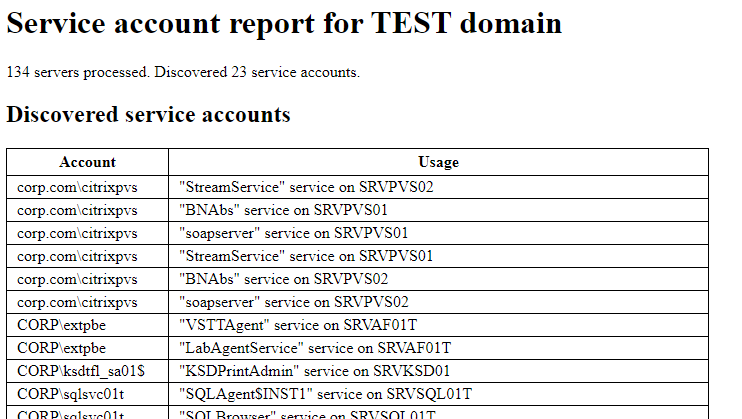
The script gather the servers list from Active Directory, and tries to retrieve from the server all information related to services and users used to run them.
Finally, all data are collected in a HTML report, like that:
References
Last updated