Powershell - Remote commands using WinRM
Powershell - Remote commands using WinRM
Would you like to learn how to execute remote commands using Powershell? In this tutorial, we are going to show you how to use the WinRM feature to execute remote commands using Powershell on a computer running Windows.
• Windows 2012 R2 • Windows 2016 • Windows 2019 • Windows 10 • Windows 7
Equipment list
The following section presents the list of equipment used to create this tutorial.
As an Amazon Associate, I earn from qualifying purchases.
Related tutorial - PowerShell
On this page, we offer quick access to a list of tutorials related to PowerShell.
Tutorial Powershell - Enable the WinRM service
Access the server where you want to execute remote commands.
As an Administrator, start a Powershell command-line.
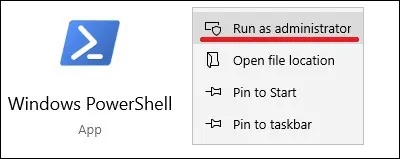
Enable the WinRM service.
Copy to Clipboard
Verify the network configuration of the WinRM service.
Copy to Clipboard
Here is the command output.
Copy to Clipboard
In our example, the WinRM service is listening on the TCP port 5985.
In our example, the WinRM service is allowing HTTP connections.
Verify the WinRM service configuration
Copy to Clipboard
Here is the command output.
Copy to Clipboard
Test the local connection to the WinRM service.
Copy to Clipboard
Here is the command output.
Copy to Clipboard
Congratulations! You are able to enable the WinRM service to allow remote commands using Powershell.
Tutorial WinRM - Remote commands using Powershell.
On the client computer, start a Powershell command-line.
Test the connection to the remote computer on the TCP port 5985.
Copy to Clipboard
Here is the command output.
Copy to Clipboard
Test the connection to the remote WinRM service.
Copy to Clipboard
Here is the command output.
Copy to Clipboard
Execute a remote command using WinRM and Powershell.
Copy to Clipboard
Enter the credentials to access the remote computer.
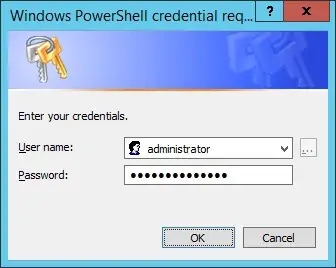
Here is the command output.
Copy to Clipboard
In our example, a single command was executed remotely using WinRM and Powershell.
Execute a remote command using a stored credential.
Copy to Clipboard
There are multiple ways to use Powershell, WinRM, and a stored credential.
Copy to Clipboard
Congratulations! You are able to use WinRM to send remote commands using Powershell.
Tutorial WinRM - Remote session using Powershell.
On the client computer, start a Powershell command-line.
Test the connection to the remote computer on the TCP port 5985.
Copy to Clipboard
Here is the command output.
Copy to Clipboard
Test the connection to the remote WinRM service.
Copy to Clipboard
Here is the command output.
Copy to Clipboard
Start a remote session using Powershell and WinRM.
Copy to Clipboard
Enter the credentials to access the remote computer.
Here is the command output.
Copy to Clipboard
In our example, a remote session was started using WinRM and Powershell.
Start a remote session using a stored credential.
Copy to Clipboard
There are multiple ways to use Powershell, WinRM, and a stored credential.
Copy to Clipboard
Congratulations! You are able to use WinRM to start a remote session using Powershell.
Last updated