How to bypass UAC in newer Windows versions
Introduction
Welcome again. This time we ae going to craft a PowerShell Script to bypass UAC.
In other words, we are going to use a Medium Integrity process that belongs to a Local Administrator to spawn a new High Integrity process, with all privileges available.
What is UAC?
UAC (User Account Control) is a security feature, introduced from Windows 7 and onward versions of Windows. This prevents that even a local administrator account can’t execute changes to operating system, unless the user specifically chooses to. It is very common to see desktop users working with Administrators account (not recommended, but common), so even if a Malware, using a compromised Local Administrator account, tries to change something in the registry, or create a new service in the system, UAC won’t let that happen.
Until someone found a way to bypass it. And there are a lot of UAC bypasses since Windows 7. It became so common that even Microsoft treats this kind of problem as “non-priority” security issue.
One way of checking if you are in a Medium Integrity process is to run the command whoami /priv and see if all privileges are available.

The image above depicts a medium integrity process, as you can see, it does not have all privileges.
When you start something “As Administrator”, and run whoami /priv, you will find out that there is a lot more.

How to Bypass UAC in newer Windows versions
I digged the internet for some bypass that could affect my own machine. And I found the amazing research of Oddvar Moe about exploiting microsoft “cmstp.exe” as a way to bypass UAC.
Later on, after more reading from Oddvar post, I stumbled with Tyler Applebaum powershell script that could trigger this vulnerabiity as well.
With all these information, I decided to work in this technique and develop my own, but to keep originality, I chose to code it in C#, so we can produce a PowerShell script with DLL reflection and very few strings so AMSI will have a hard time blocking it.
The resulting C# code is this one:
Name it “Source.cs”.
To compile it, use the following syntax, in a PowerShell shell that is in the same directory as this source.
Now you have this “dll” with our C# code.
To use this bypass directly from DLL, check this powershell trick:
And a high-integrity cmd.exe should pop up in your screen!
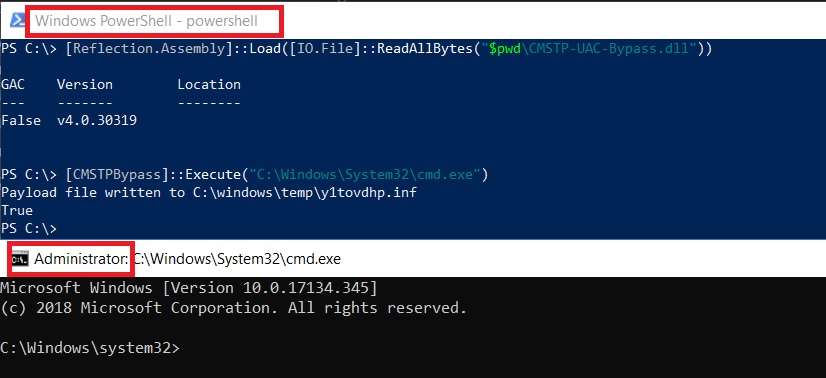
As you can see, we have gone from a non-UAC process and spawned a Administrator process!
I tested this technique with Windows 10 build 17134, version 1803 and it worked flawlessly!
Weaponizing with PowerShell
Now we go to automation. To create a PowerShell script to exploit this technique, I have used the same old DLL reflection that I always like to use.
This is enough. You can import this function and execute it like this, to spawn an elevated process:

I hope you liked to know more about this technique. Bypassing UAC is an important step when compromising Local Administrator accounts. After UAC, you can “get system” very easily.
Best regards,
zc00l.
Last updated