/etc/sudoers
What is SUDOERS file in Linux?
The sudoers file is a file Linux administrators use to allocate system rights to system users. This permit actions of users, what can be done and what can not be done. In Linux there are different type of users (root user, system users, local users, network users).
What is SUDO in Linux?
Meaning of sudo is “substitute user do” or “super user do”. Sudo command allows temporarily elevate the current user (non root) account to have root privileges.
Why SUDOERS and SUDO ?
Local users don’t get privileges as much as root users get (default behavior). Sometime we need to have root (administrator) privileges to run command from a local user.
Eg: cat /etc/shadow
You can not view password information file “cat /etc/shadow” from a local/regular user. But if you execute same command with sudo as a prefix, it works.
Eg: sudo cat /etc/shadow
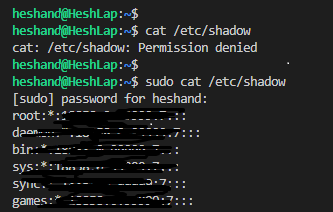
The /etc/shadow file contain password information (even passwords are encrypted). These are sensitive information, hence need to stored securely. Unauthorized users shouldn’t allow viewing this file. But in case a regular user need to access, you can configure that user as a sudo user to view that file.
What is /etc/sudoers ?
The sudo command allows non root users to run commands that would normally require super user privileges (root user). The sudoers file instructs the system how to handle the sudo command (what can each sudo user do).
The sudo is a command (prefix for Linux command) and sudoers is a file (/etc/sudoers).
What is /etc/sudoers.d/ ?
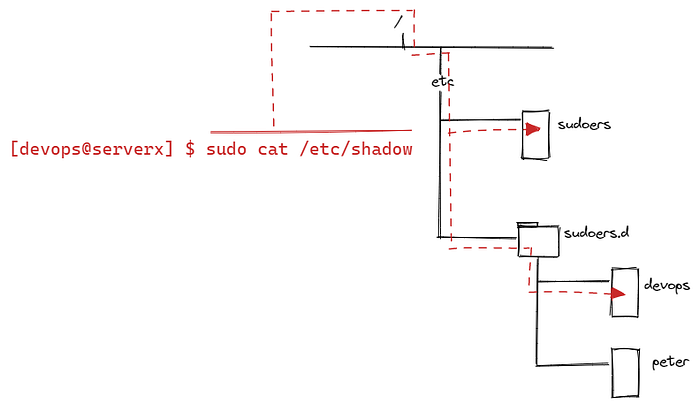
When we run sudo as a prefix for Linux command it checks whether that user configured in sudoers location. Default sudoers file locates /etc/sudoers (a file) and customize sudoers files can be create under /etc/sudoers.d (a directory). Customize changes overwrites default configurations.
The best way is to write separate/customize sudoers file under sudoers.d directory.
Why /etc/sudoers.d/ ?
Changes made to files in /etc/sudoers.d/ remain in place if you upgrade the system. This can prevent user lockouts when the system is upgraded. The sudoers files are very sensitive, any misconfigurations will affect to users logins. Making wrong change on default sudoers file can affect whole system.
The /etc/sudoers file configurations
General sudoers file format:
username/groupname servername/servergroup = (usernames command can be run as) command
Instead of mentioning specific names, we can logically group these thing. That will done by alias. In sudoers file there are different alias available to make this simple.
User Alias
We can specifies a group of users by username; simply which users can use “sudo” as a prefix for commands.
Runas Alias
This specifies a group of users by UID. We can define which accounts are authorized to “run commands as”. This allows sam user to run any command on DBSERVERS hosts as either oracle user or mysql user.
Cmnd Alias
Command alias define a list of commands and directories.
Hosts Alias
This specifies a list of hostnames.
Instead of specifying each hostname/ip address; group can be refer as DEVSERVERS.
Below are few examples with pointers to understand the scenarios.
Please read the comment lines to understand the how filtering has been configured for each and every case.
Sample Diagram 1
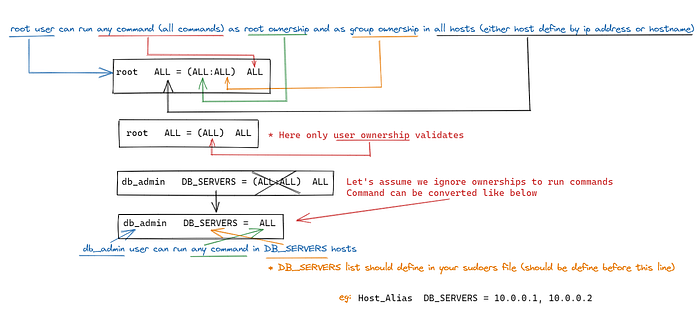
Hope you could able to understand the format of sudo parameters.
As per above sketch diagram you can see how each parameter refers which/user or ownership or host group or command set matches.
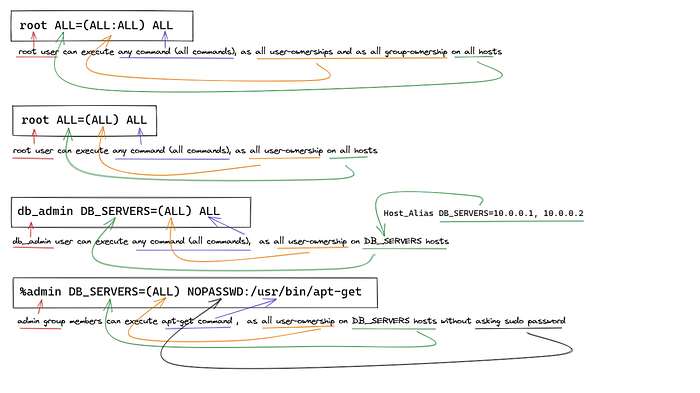
Furthermore look at below sketch drawn with arrows to point out the meaning of each parameter.
Sample Diagram 2
Last updated